Entra ID grant admin consent
To allow the users to log in to Gatekeeper with their accounts of the organization tenant, the Entra ID tenant administrator should consent to the applications once on behalf of the organization. Once done, tenant users are able to log in without issues.
Application consent helper
The Application Consent Helper tool helps Entra ID tenant administrators to create consent links for their organization. This tool is useful during the onboarding process when the Entra ID tenant administrator needs to provide consent for the API, web portal, Web Agent Console (WAC), and Voice ID applications on behalf of the organization.
Depending on the geographic region of the deployment you are using, use either of the following URLs to open the Gatekeeper Onboarding page to generate the correct links for the admin consent:
- Australia: https://portal.gatekeeper.nuance.net.au/webapp/onboard
- Canada: https://portal.gatekeeper.nuance.ca/webapp/onboard
- Europe: https://portal.gatekeeper.nuance.eu/webapp/onboard
- Japan: https://portal.gatekeeper.apac.nuance.com/webapp/onboard
- United Kingdom: https://portal.gatekeeper.nuance.co.uk/webapp/onboard
- United States: https://portal.gatekeeper.nuance.com/webapp/onboard
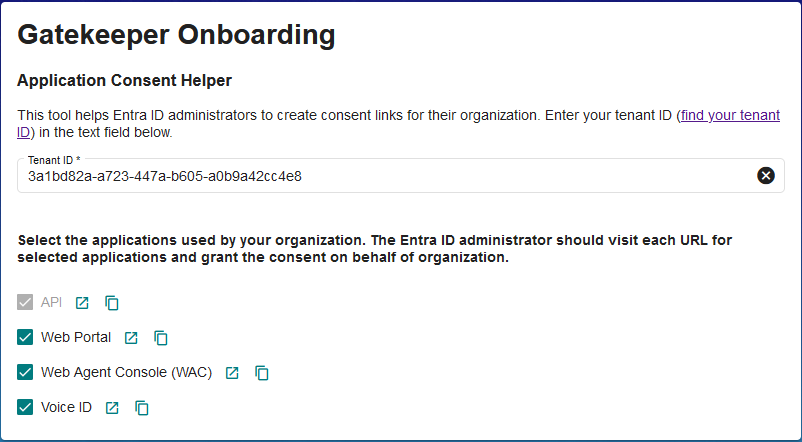
Once you enter your Tenant ID, the Application Consent Helper tool generates the consent links for the Gatekeeper API, Gatekeeper web portal, web agent console, and Voice ID applications. The Entra ID tenant administrator can click the generated links to provide consent for the applications on behalf of all users in the tenant.
Note:
Once the administrator consents to the applications on behalf of the organization for all the users under their tenant, the following message appears: “Sorry, but we’re having trouble signing you in.”
This behavior is normal because the browser doesn’t know where to redirect after that. The administrator can close the pop-up window and try to log in to Gatekeeper web portal.