Contact center workflows
When a call comes into the contact center, Gatekeeper executes a flow that determines when to enroll the caller, when to verify the caller, and so on. Each deployment has pre-defined flows that can be customized using custom logic webhooks and flow configuration parameters.
Configuration parameters
Set the following configuration parameters to control the custom flow:
- AuthenticationResultKVP
- BusinessLogicWebhookType
- BusinessLogicWebhookConfig
- ContinueEnrollForRiskySession
- DefaultConfigSetName
- PerformAudioSpoofingDetection
- DetectFraudConfigSetName
- DetectFraudOnEnroll
- DetectFraudOnLocked
- DetectFraudOnMismatch
- DetectFraudOnOptedOut
- DetectFraudOnOptingOut
- EngagementCorrelationKeys
- EnrollConfigSetName
- EnrollmentResultKVP
- ExternalPersonIdKey
- ExternalPersonIdValidationRegex
- FlowVersion (see available flows version)
- GKEngagementIdentifierKey
- IdentifyConfigSetName
- IgnoredCallTypes
- OptOutDurationOnFraudsterDetected
- OptOutReasonOnFraudsterDetected
- RecordingIdentifierKey
- RecordingSide
- RestartSessionEndsConference
- SpeakerChannel
- SetKVPCallIdentifierKey
- VerifyConfigSetName
- VoiceprintTag
- Watchlist
- WatchlistVoiceprintTag
- MaxRecordingDuration
- PersonIDKVP
- PostCallDetectFraudOnMatch
- PostCallDetectFraudOnMismatch
- PostCallDetectFraudOnRiskySession
- PostCallDetectFraudOnEnrollment
- PostCallDetectFraudOnLockedOrOptedOut
- PostCallDetectFraudOnOptingOut
- PostCallDetectFraudOnSuspicious
- PostCallDetectFraudConfigSetName
- WebhookAbortFlowOnError
For more details about the flow configuration parameters, see Configuration parameters.
Available flow versions
The following table lists the values supported by the FlowVersion parameter:
| Values | Description | Webhook | Web Agent Console | Silent Data Collection |
|---|---|---|---|---|
| v1 | Person flow | Optional | Supported | Supported |
| v2 | Person flow (with AnalyzeAudio) | Optional | Supported | Supported |
| group-v1 | Grouping flow | Required | Supported | Supported |
| dkf-v1 | Detect known fraudsters flow | Optional | Supported | Supported |
| dkf-v2 | Detect known fraudsters flow (with AnalyzeAudio) | Optional | Supported | Supported |
Custom logic webhooks explained
The Custom Logic Webhook is a customer-provided web service that Gatekeeper can query during the execution of a contact center flow. When set up, a service implementing that API can customize the flow by changing its behavior during a call. The API is defined by Nuance and implemented by the web service.
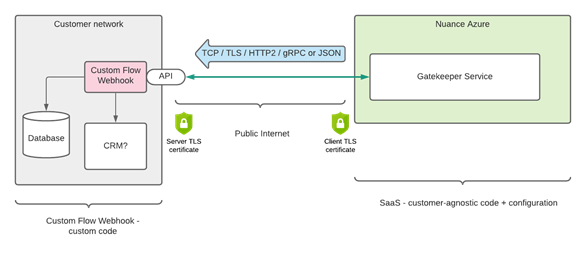
The webhook service is hosted outside of the Gatekeeper service. It is reached over the public Internet by using a secure 2-way TLS connection. Each scope that wants to use a webhook service must be configured to tell Gatekeeper where to reach it, using a public DNS host name. Currently, the webhook needs to implement a gRPC API (unary). We also support an OpenAPI (“Swagger”) REST API.
Webhook API overview
The contact center flows are implemented using a sequence of events and actions. For some events, the Gatekeeper engine informs the flow (BLL) about the event, giving the opportunity to the flow to respond with what actions should be taken as the next step in the flow.
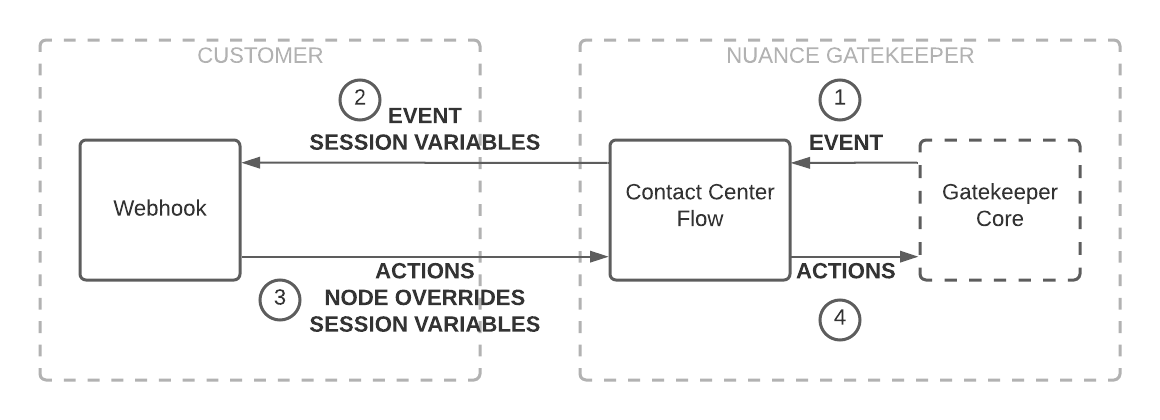
Events include:
- Progress and completion of biometric operations, including their results,
- Telephony events, including call start, call end, holding the line, transfers, and conferences,
- Recording status events,
- And more…
As a result, the flow responds with zero or many actions, which represents asynchronous calls to the various Gatekeeper APIs. When a custom logic webhook is configured, the flow sends every event to the webhook and gives it the opportunity to add actions or override the flow’s behavior before the flow returns the resulting actions to the Gatekeeper Engine.
Since the flow waits for the webhook before continuing its execution, the webhook should respond to Gatekeeper as quickly as possible. If the webhook does not respond quickly enough, the flow resumes its execution as if the webhook returned no action. See Configuration (gRPC) and Configuration (REST) for more information on how to use webhooks.